

How We Made Andy's Home Accessible for Under $5,000 (Smart Home Case Study)
Andy and his wife both live with MS.
Andy uses a wheelchair for mobility, and as his condition progresses, he wanted to prepare their home for the future – making it as accessible and independent as possible while he still could.
He called us with a clear goal: voice control for lights and ceiling fans throughout the house.
No switches to reach. No fumbling in the dark. Just "Alexa, turn on the bedroom light" – and it works.
We installed EyZEE® smart switches and downlights through their home, connected everything to Alexa, and gave Andy full voice control of his lighting and fans.
But then he mentioned the hallway.
The Challenge: A Hallway That Needed to Know the Difference
The hallway leading to their bedroom needed to light up automatically when Andy passed through at night – especially important as his mobility decreases.
Simple enough, right? Motion sensor, done.
Except for one small problem: their cat.
The family cat walks that hallway constantly at night. A standard motion sensor would trigger the lights every time – defeating the whole purpose of automation and wasting energy.
Andy needed a sensor that could tell the difference between a person in a wheelchair and a cat on the floor.
The Solution: Precision Detection + Smart Automation
We used two key products:
1. Decouplar™ Smart Light Switches
These allow the lights to be controlled by voice, app, automation, AND the wall switch – all at once. Perfect for accessibility because family members can still use the physical switch, while Andy controls everything by voice.
2. Human Presence Sensor (HPS) – Ceiling Mounted
This isn't your standard motion sensor. It's a millimeter-wave radar sensor that detects human presence with incredible precision.
The Technical Setup: How We Configured the Sensor
Here's how we set up the Human Presence Sensor to detect Andy in his wheelchair while ignoring the cat:
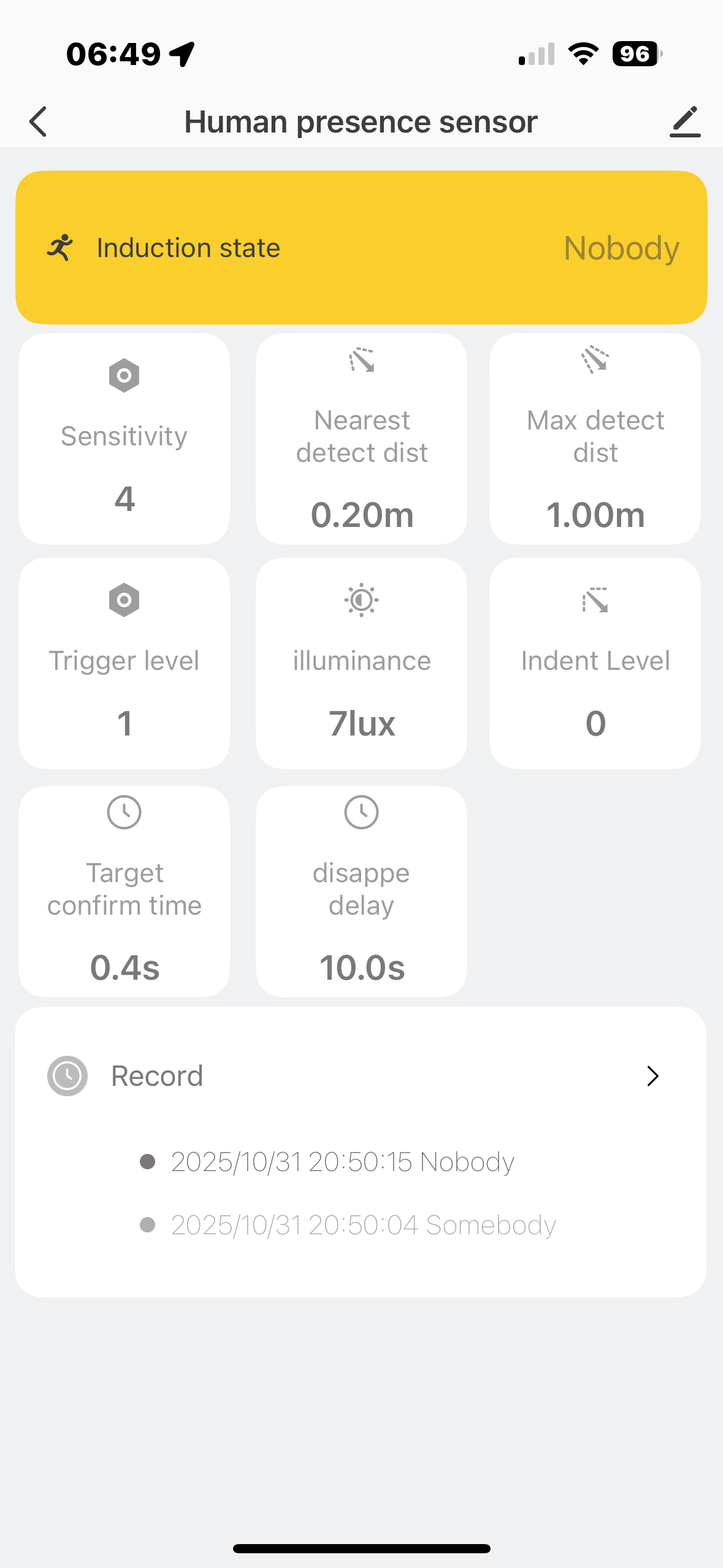
Human Presence Sensor precision settings
The Settings That Made It Work:
- Nearest detect distance: 0.20m – Ignores anything below wheelchair height (like cats on the floor)
- Max detect distance: 1.00m – Creates a focused detection zone in the hallway
- Sensitivity: 4 – Tuned to detect human movement, not small animals
- Trigger level: 1 – Immediate response when detection occurs
- Target confirm time: 0.4s – Quick activation without false triggers
- Disappear delay: 10.0s – Lights stay on long enough for Andy to pass through
The result? The sensor detects Andy in his wheelchair perfectly – and completely ignores the cat.
The Automation: Set It Once, Forget It Forever
We created two simple automations in the Smart Life app:
When Motion is Detected at Night:
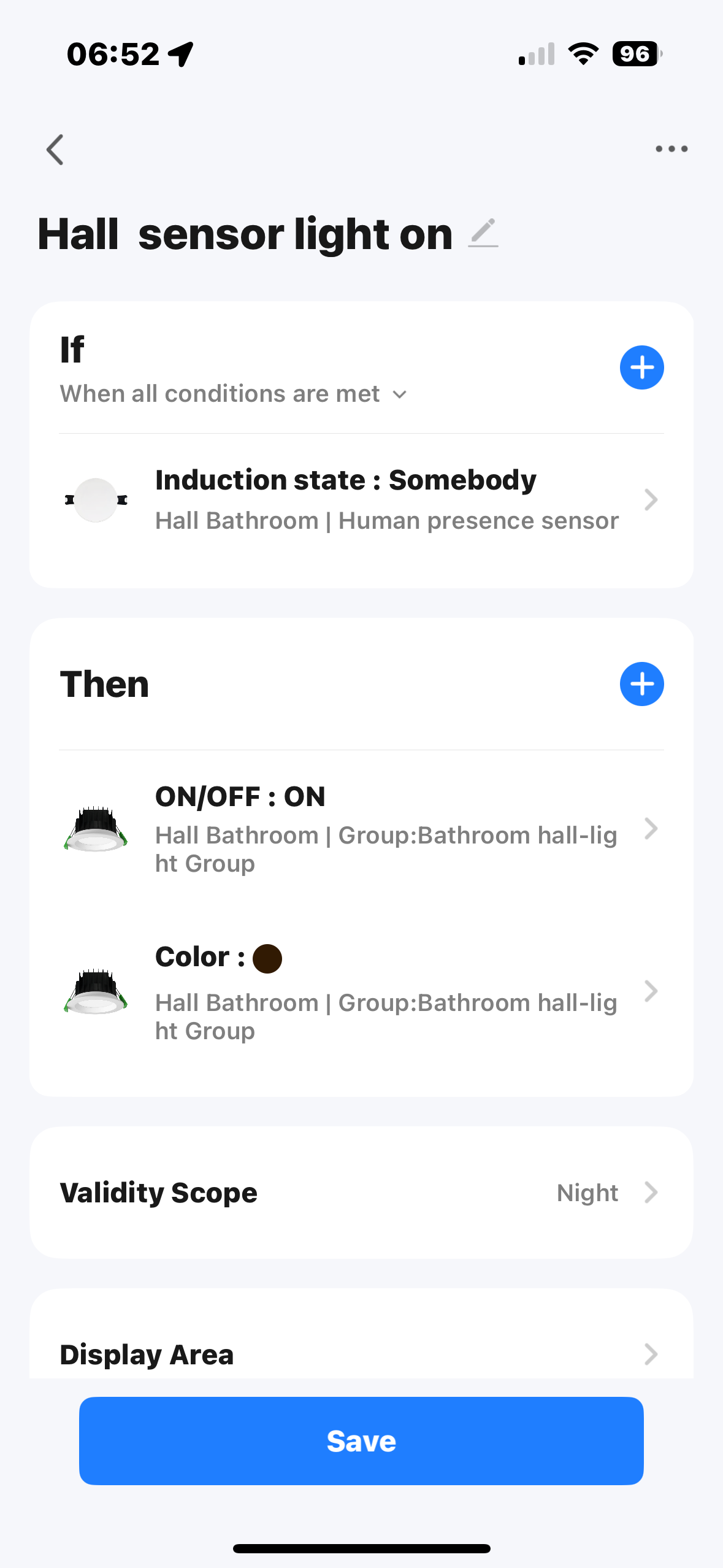
- IF Sensor detects "Somebody"
- AND Validity Scope = Night
- THEN Turn lights ON (warm color)
When Motion Clears:
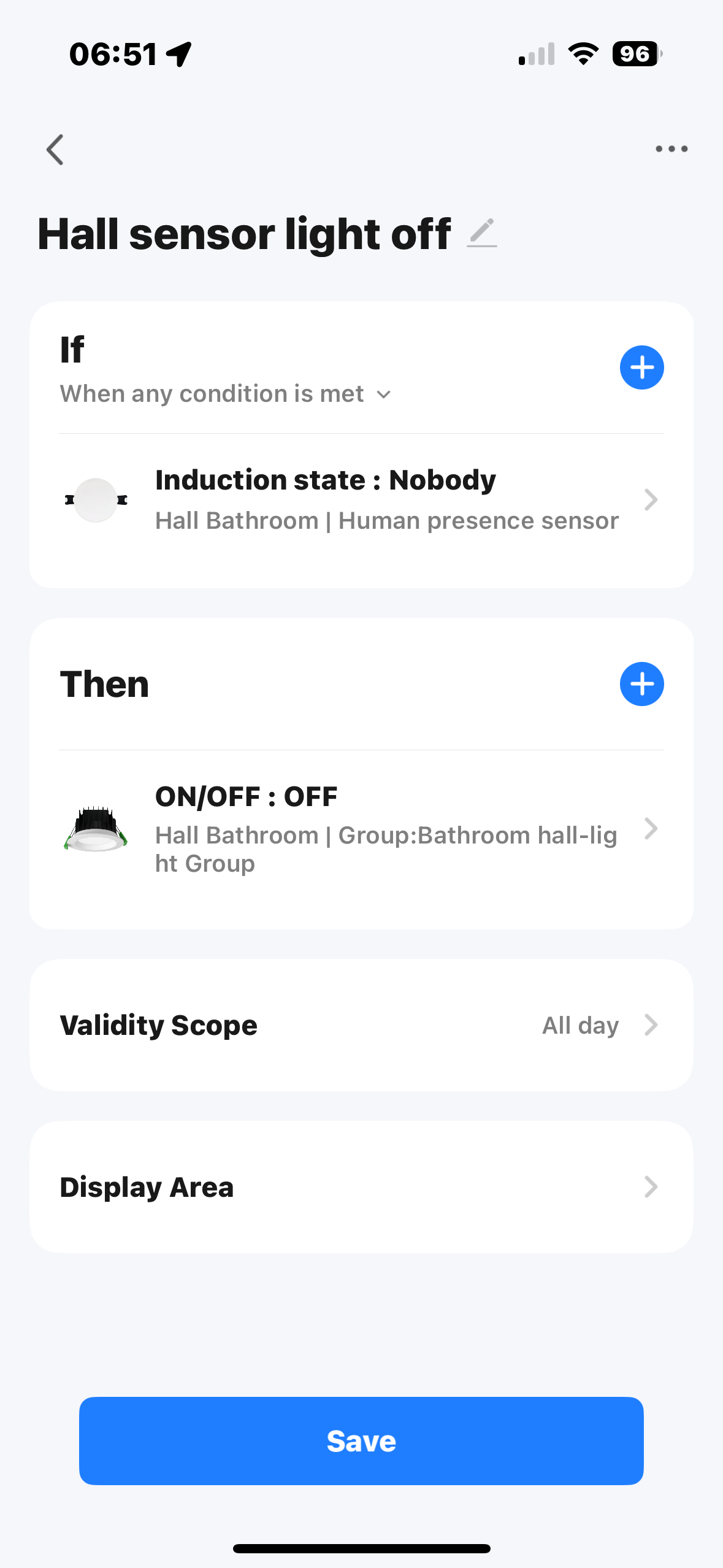
- IF Sensor shows "Nobody"
- THEN Turn lights OFF
Set it once. Forget it forever.
Why This Matters: Independence and Dignity
For Andy, this isn't just about convenience – it's about independence and dignity.
As his mobility reduces, he doesn't want to rely on others to turn lights on and off. He doesn't want to struggle with switches he can't reach. And he definitely doesn't want to navigate a dark hallway at night.
Now, his home responds to him automatically. The lights know when he needs them. His voice controls everything. And the hallway? It knows the difference between Andy and his cat.
The Investment: Under $5,000 for a Complete Smart Home Fitout
Andy and his wife's home is 20 years old – a large 4-bedroom house they built themselves.
The complete smart home accessibility fitout included:
- 73 smart light switches and downlights throughout the home
- Smart fan controllers for existing AC ceiling fans
- Human Presence Sensors for automation
- Professional electrician installation
- Complete system programming and setup
- Voice control integration with Alexa
Total Cost: Under $5,000
For a large 4-bedroom home, that's exceptional value – especially when you consider it extends the usable life of their home for the foreseeable future.
Compare that to the cost of moving to a more accessible home, or ongoing modifications as mobility needs change. This investment gives Andy and his wife independence, dignity, and the ability to age in place in the home they built together.
Products Used in Andy's Smart Home
EyZEE® Smart Switches & Downlights
Voice control, app control, and physical switches – all working together. Perfect for accessibility.
Decouplar™ Smart Light Switches
Allows automation, voice, app, and wall switch control simultaneously. No compromises.
Human Presence Sensor (HPS)
Ceiling-mounted millimeter-wave radar sensor with precision detection. Ignores pets, detects people.
All products work with Alexa, Google Home, and Apple HomeKit
Frequently Asked Questions About Accessible Smart Homes
How much does accessible smart home automation cost?
A complete 4-bedroom home fitout with 73 smart switches, downlights, fan controllers, sensors, professional installation, and programming costs under $5,000. Single-room solutions start from as little as $500-$1,000.
Can smart home technology work for wheelchair users?
Absolutely. Voice control eliminates the need to reach physical switches, while automation (like motion-activated lighting) removes the need for manual control entirely. Human Presence Sensors can be configured to detect wheelchair users at specific heights.
What's the difference between motion sensors and human presence sensors?
Standard motion sensors detect any movement and can be triggered by pets. Human Presence Sensors use millimeter-wave radar technology with adjustable detection zones, sensitivity levels, and height parameters – allowing them to distinguish between people and pets.
Do I need an electrician to install smart switches?
Yes, in Australia all hardwired smart switches and downlights must be installed by a licensed electrician. This ensures safety and compliance with Australian electrical standards.
Will this work with my existing ceiling fans?
Our smart fan controllers work with most AC ceiling fans (rotary knob control) and many DC ceiling fans (remote control). They won't work with chain-pull fans. Contact us to confirm compatibility with your specific fans.
Can the system distinguish between people and pets?
Yes! As demonstrated in Andy's hallway, Human Presence Sensors can be configured with specific detection zones and height parameters to detect people while ignoring pets on the floor.
Planning an Accessible Smart Home?
Whether you're dealing with reduced mobility now or planning ahead for the future, smart home technology can restore independence and dignity.
We've helped dozens of families create accessible smart homes – from single-room solutions to whole-house retrofits.
Get Expert Advice for Your Accessible Smart Home
Call us on 04 6806 2390 (Ai assistant anytime - Office Mon-Fri, 9am-5pm AEST) or reply below with your questions.
Whether you're a homeowner preparing for the future, a family member helping a loved one, or a builder specifying accessible solutions for a project, we'd love to discuss your specific needs.
About the author: Ian Calderwood is the founder of Smart Homes Matter®, specializing in accessible smart home solutions for Australian homes. With many years of experience in Home Automation on a background as a Register Nurse, Ian has helped hundreds of families create homes that adapt to their changing needs.